 Sitch
SitchSkitch for Windows is gone.
Here's the free replacement.
Evernote shut down Skitch for Windows in January 2016. Sitch rebuilds the same snap-and-mark-up workflow natively for Windows 10 and 11 — free, open source, and offline.
One portable ~86 MB .exe · .NET runtime built in · no installer, no admin rights
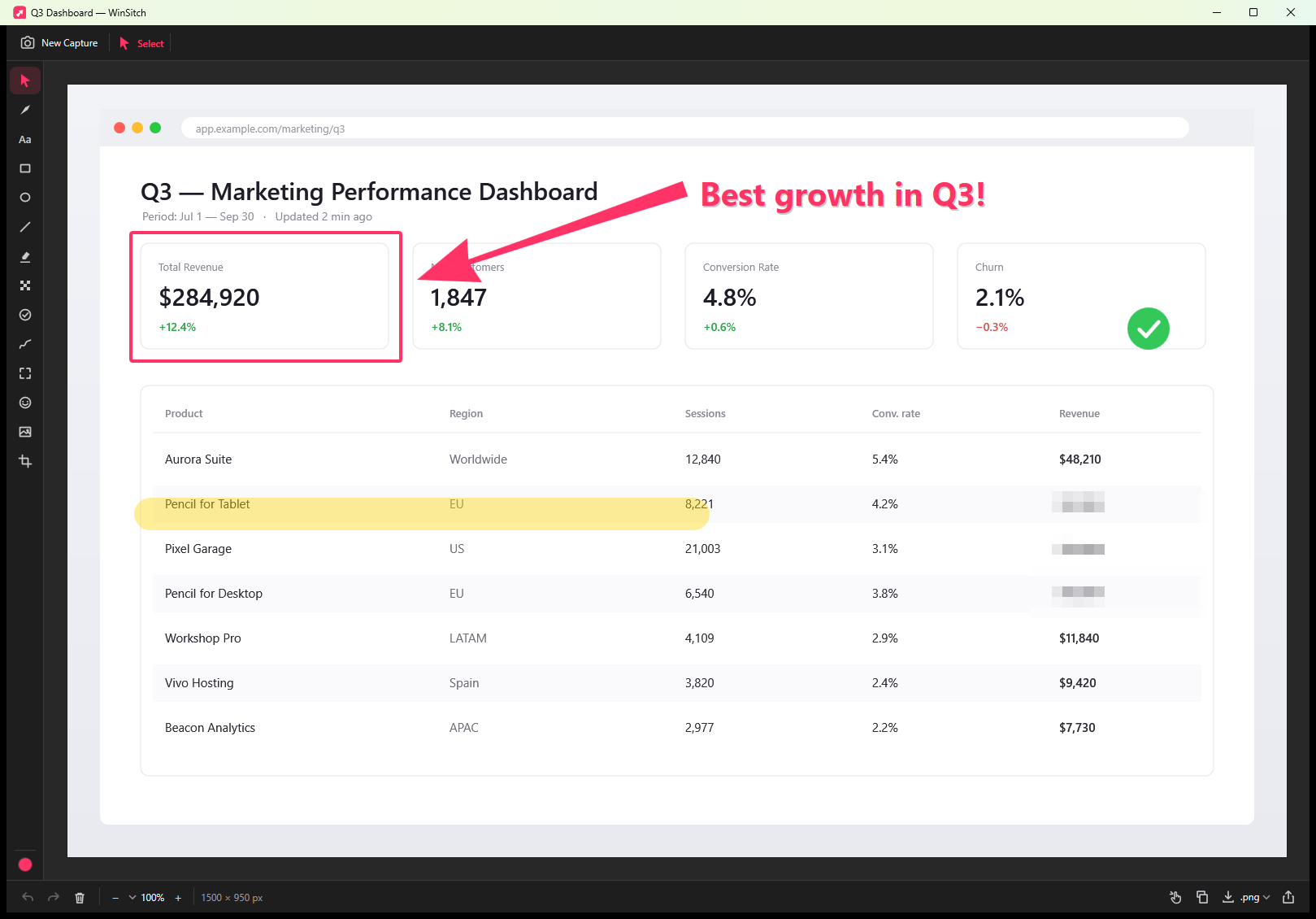
How to annotate a screenshot on Windows with Sitch
- Download WinSitch.exe and run it. Sitch appears in the system tray.
- Press Ctrl+Alt+4. Drag over a region, or click a window to capture just that window.
- The editor opens with the Arrow tool ready. Drag from tail to tip for the classic tapered arrow.
- Add text, boxes or a highlight, and use Obscure to pixelate or block out anything sensitive.
- Press Ctrl+C and paste into Slack, Teams or email — or drag the image straight out of the editor.
The capture is copied to your clipboard as soon as you take it, so you can paste before you even annotate. Need the same area again? Ctrl+Alt+Shift+4 recaptures the last region. Ctrl+Alt+Shift+C captures straight to the clipboard without opening the editor.
Built for how Windows actually works
Multi-monitor & mixed DPI
Captures true physical pixels, even with a 4K laptop at 150% next to a 1080p monitor at 100%.
Clean window capture
Click a window to capture its content, even when other windows partly cover it.
Lives in the tray
Left-click to capture; right-click for window or full-screen capture per display, the timer and Settings.
Works with Win+PrtScn
Optionally open the editor automatically after a Windows screenshot.
Sitch vs. Snipping Tool, ShareX and Greenshot
Snipping Tool is built in but basic: no tapered arrow, blur or pixelate, and no editable objects. ShareX and Greenshot are powerful free tools, but they're built around upload destinations and workflows rather than Skitch's single-hotkey simplicity. Sitch focuses on one thing: fast, good-looking, private annotation — and it works the same way on a Mac.
FAQ
Is Sitch safe? Why does SmartScreen warn me?
The Windows build isn't code-signed yet, so SmartScreen shows a warning on first run. Choose More info → Run anyway. Sitch is open source — you can read every line or build it yourself from the GitHub repo.
Does it need an installer or admin rights?
No. It's one self-contained .exe. Run it from anywhere; delete it to uninstall.
Which Windows versions are supported?
Windows 10 version 1903 or later and all Windows 11 releases, x64.
Can I change the Ctrl+Alt+4 hotkey?
Yes — Settings ▸ Capture. (Win+Shift+S is reserved by Windows itself.)