 Sitch
SitchA native Skitch for Mac,
built for Apple Silicon
Skitch for Mac hasn't been updated since 2020 and only runs on Apple Silicon through Rosetta 2, which Apple is phasing out after macOS 27. Sitch is the same snap-and-mark-up workflow, rewritten in Swift for modern macOS. Free and open source.
macOS 15 Sequoia or later · universal (Apple Silicon + Intel) · signed & notarized by Apple
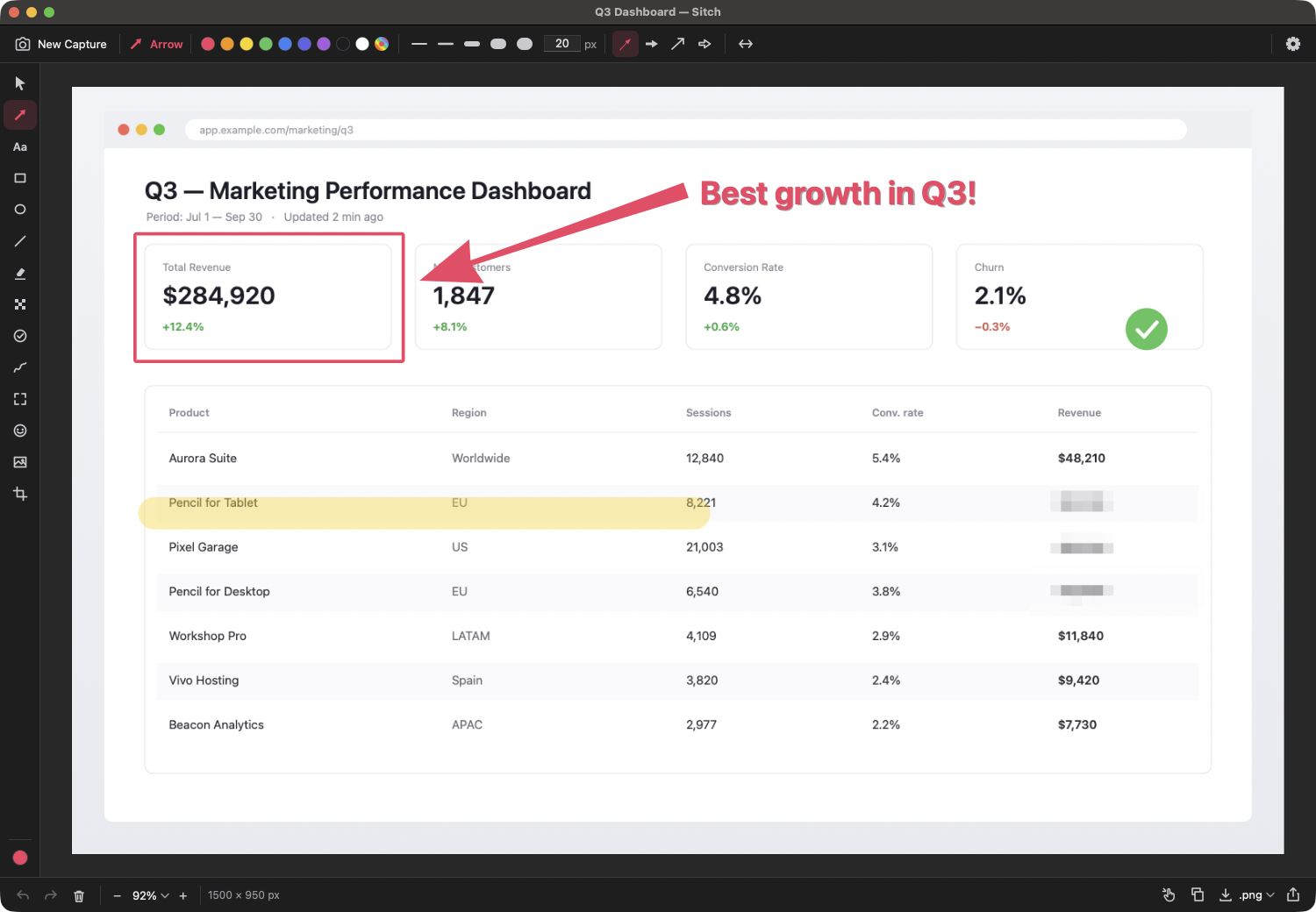
How to annotate a screenshot on a Mac with Sitch
- Open Sitch.dmg and drag Sitch to Applications. It lives in the menu bar.
- On first launch, grant Screen Recording permission when asked (macOS requires it for every screenshot app).
- Press ⌘⌥4. Drag over a region, or click a window to capture just that window.
- Draw a tapered arrow, add text or a box, and use Obscure to pixelate or block out anything private.
- Press ⌘C and paste into Slack, Messages or Mail — or drag the image out, or use the share sheet.
⌘⌥⇧4 recaptures the last region; ⌃⌥⌘4 captures straight to the clipboard without opening the editor. Prefer the built-in ⌘⇧4? Sitch can open the editor automatically after any system screenshot.
Why not just use Markup or CleanShot X?
macOS Markup is built in, but it has no pixelate or blur and only basic arrows, and it routes through the screenshot thumbnail or Preview. CleanShot X is excellent but paid and Mac-only. Sitch is free, open source, gets you from hotkey to annotated image in one step, and works identically on Windows if your team uses both.
FAQ
Does Sitch run natively on M1, M2, M3 and M4 Macs?
Yes. It's a universal binary — native on Apple Silicon and Intel, no Rosetta required.
Why does Sitch need Screen Recording permission?
macOS requires it for any app that reads the screen. Sitch uses it only to capture what you select; it makes no network connections.
Which macOS versions are supported?
macOS 15 Sequoia or later.
Can I import my old Skitch files?
Sitch opens any PNG, JPEG or TIFF image for annotation, including images you exported from Skitch.